Category Archives: Incanter

Student’s t-test

This example will demonstrate the t-test function for comparing the means of two samples. You will need the incanter.core, incanter.stats, incanter.charts, and incanter.datasets libraries.

Load the necessary Incanter libraries.

(use '(incanter core stats charts datasets))

For more information on using these packages, see the matrices, datasets, and sample plots pages on the Incanter wiki.

Now load the plant-growth sample data set.

(def plant-growth (to-matrix (get-dataset :plant-growth)))

Break the first column of the data into three groups based on the treatment group variable (second column) using the group-by function,

(def groups (group-by plant-growth 1 :cols 0))

and print the means of the groups

(map mean groups) ;; returns (5.032 4.661 5.526)

View box-plots of the three groups.

(doto (box-plot (first groups))
      (add-box-plot (second groups))
      (add-box-plot (last groups))
      view)

This plot can also be achieved using the :group-by option of the box-plot function.

(view (box-plot (sel plant-growth :cols 0) 
                :group-by (sel plant-growth :cols 1)))

Create a vector of t-test results comparing the groups,

(def t-tests [(t-test (second groups) :y (first groups))
              (t-test (last groups) :y (first groups))
              (t-test (second groups) :y (last groups))])

Print the p-values of the three groups,

(map :p-value t-tests) ;; returns (0.250 0.048 0.009)

Based on these results the third group (treatment 2) is statistically significantly different from both the first group (control) and the second group (treatment 1). However, treatment 1 is not statistically significantly different than the control group.

The complete code for this example can be found here.

Further Reading

Correlation and permutation tests

Permutation tests can be used with many different statistics, including correlation.

For this example, you will need the incanter.core, incanter.stats, incanter.charts, and incanter.datasets libraries. The incanter.datasets library contains sample data sets.

Load the necessary Incanter libraries.

(use '(incanter core stats charts datasets))

For more information on using these packages, see the matrices, datasets, and sample plots pages on the Incanter wiki.

Load the us-arrests data set:

(def data (to-matrix (get-dataset :us-arrests)))

Now extract the assault and urban population columns:

(def assault (sel data :cols 2))
(def urban-pop (sel data :cols 3))

Calculate the correlation between assaults and urban-pop:

(correlation assault urban-pop)

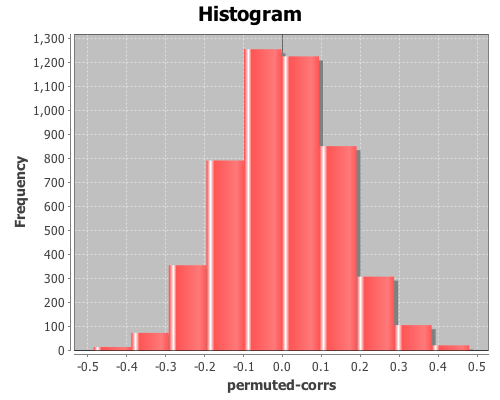
The sample correlation is 0.259, but is this value statistically significantly different from zero? To answer that, we will perform a permutation test by creating 5000 permuted samples of the two variables and then calculate the correlation between them for each sample. These 5000 values represent the distribution of correlations when the null hypothesis is true (i.e. the two variables are not correlated). We can then compare the original sample correlation with this distribution to determine if the value is too extreme to be explained by null hypothesis.

Start by generating 5000 samples of permuted values for each variable:

(def permuted-assault (sample-permutations 5000 assault))
(def permuted-urban-pop (sample-permutations 5000 urban-pop))

Now calculate the correlation between the two variables in each sample:

(def permuted-corrs (map correlation 
                         permuted-assault 
                         permuted-urban-pop))

View a histogram of the correlations

(view (histogram permuted-corrs))

And check out the mean, standard deviation, and a 95% interval for the null distribution:

(mean permuted-corrs)

The mean is near zero, -0.001,

(sd permuted-corrs)

the standard deviation is 0.14,

(quantile permuted-corrs :probs [0.025 0.975])

and the values returned by the quantile function are (-0.278 0.289), which means the original sample correlation of 0.259 is within the 95% interval of the null distribution, so the correlation is not statistically significant at an alpha level of 0.05.

The complete code for this example is found here.

Further Reading

Principal components analysis

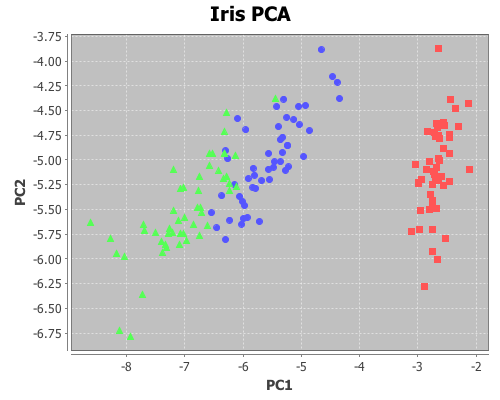
Principal components analysis (PCA) is often used to reduce the number of variables, or dimensions, in a data set in order to simplify analysis or aid in visualization. The following is an example of using it to visualize Fisher’s five-dimensional iris data on a two-dimensional scatter plot, revealing patterns that would be difficult to detect otherwise.

First, principal components will be extracted from the four continuous variables (sepal-width, sepal-length, petal-width, and petal-length); next, these variables will be projected onto the subspace formed by the first two components extracted; and then this two-dimensional data will be shown on a scatter-plot. The fifth dimension (species) will be represented by the color of the points on the scatter-plot.

For this example, you will need the incanter.core, incanter.stats, incanter.charts, and incanter.datasets libraries. The incanter.datasets library contains sample data sets.

Load the necessary Incanter libraries.

(use '(incanter core stats charts datasets))

For more information on using these packages see the matrices, datasets, and sample plots pages on the Incanter wiki.

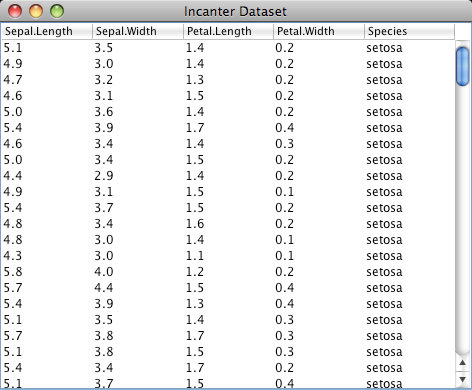
Next, load the iris dataset and view it.

(def iris (to-matrix (get-dataset :iris)))
(view iris)

Then, extract the columns to use in the PCA,

(def X (sel iris :cols (range 4)))

and extract the “species” column for identifying the group.

(def species (sel iris :cols 4))

Run the PCA on the first four columns only

(def pca (principal-components X))

Extract the first two principal components

(def components (:rotation pca))
(def pc1 (sel components :cols 0))
(def pc2 (sel components :cols 1))

Project the four dimension of the iris data onto the first two principal components

(def x1 (mmult X pc1)) 
(def x2 (mmult X pc2))

Now plot the transformed data, coloring each species a different color

(view (scatter-plot x1 x2 
                    :group-by species
                    :x-label "PC1" 
                    :y-label "PC2" 
                    :title "Iris PCA"))


The complete code for this example can be found here.

Further Reading

Introduction to Incanter

This blog will focus on statistical programming in the Clojure language using Incanter.

Incanter is a Clojure-based, R-like statistical computing and graphics environment for the JVM. At the core of Incanter are the Parallel Colt numerics library, a multithreaded version of Colt, and the JFreeChart charting library, as well as several other Java and Clojure libraries.

The motivation for creating Incanter is to provide a JVM-based statistical computing and graphics platform with R-like semantics and interactive-programming environment. Running on the JVM provides access to the large number of existing Java libraries for data access, data processing, and presentation. Clojure’s seamless integration with Java makes leveraging these libraries much simpler than is possible in R, and Incanter’s R-like semantics makes statistical programming much simpler than is possible in pure Java.

Motivation for a Lisp-based R-like statistical environment can be found in the paper Back to the Future: Lisp as a Base for a Statistical Computing System by Ihaka and Lang (2008). Incanter is also inspired by the now dormant Lisp-Stat (see the special volume in the Journal of Statistical Software on Lisp-Stat: Past, Present, and Future from 2005).

Motivation for a JVM-based Lisp can be found at the Clojure website, and screencasts of several excellent Clojure talks by the language’s creator, Rich Hickey, can be found at clojure.blip.tv.

Visit the Github source repository to download the Incanter library and source code, and for information on getting started with Clojure and Incanter, visit the getting started page on the Incanter wiki; for plotting examples, see the sample plots page; for examples of probability and statistical functions, see the probability distributions and statistics examples pages; for examples of matrix operations, see the matrices page; for examples of data I/O functions, see the datasets page; and for descriptions of all of Incanter’s functions, see the API page.